
A PlanSwift alternative for lumber and framing takeoffs
PlanSwift is a Windows desktop tool where you measure the plans and your assemblies turn measurements into materials. Aximos reads the plan set and drafts the whole framing takeoff and material list for you, in the browser, and you check every number against the plan.
Measure it yourself, or check a draft
Many lumber yards and framing estimators built their process on PlanSwift. If yours still means tracing every wall by hand, here is how Aximos compares, when PlanSwift is still the better tool, and what switching actually takes.
In PlanSwift you set the scale, measure walls, areas and counts, and drop assemblies onto the plan so they calculate studs, plates, headers and sheathing. Its Takeoff BOOST tools can find area, linear and count measurements on a plan page as a first pass. The framing list comes from your assemblies, applied to your measurements.
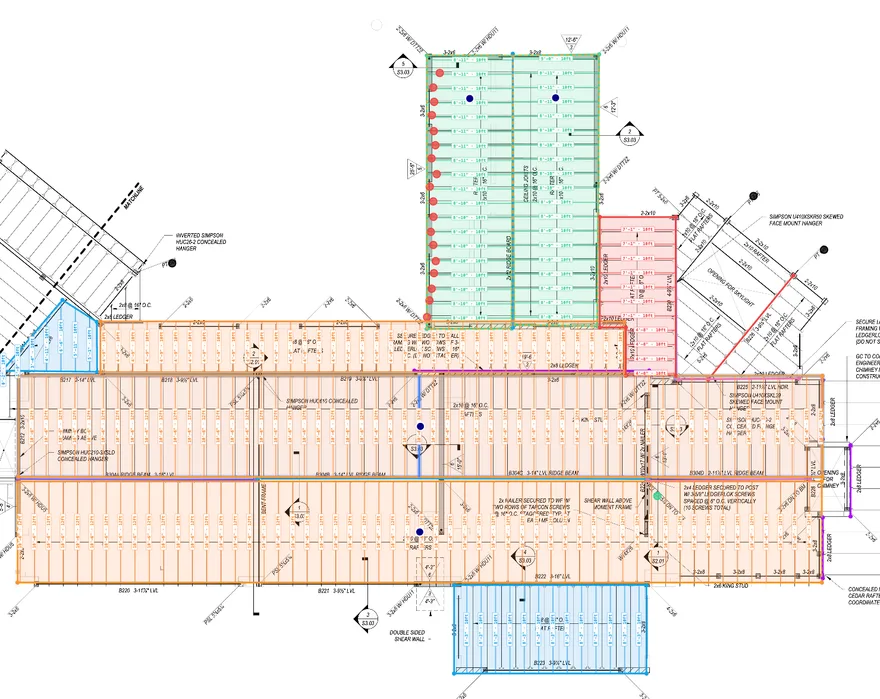
In Aximos the AI does the takeoff first. It calibrates every sheet, traces the framing by layer, reads the notes and sections, and builds the material list by size and length on your own SKUs. First drafts are typically 80–95% accurate to final quantities. Your time goes into checking: click any quantity to see the lines it came from and the formula behind it, fix what is off, and the list updates.
Two ways to the same lumber list
- YouSet the scale
- YouMeasure walls, areas, counts
- YouApply assemblies
- YouCheck the list
 Aximos
- YouUpload the plan set
- AITracing and material list drafted
- YouCheck each number against its trace
- YouExport to Excel or CSV
Same output, a lumber list on your products. With Aximos your time goes into checking, not counting.
The whole framing list, drafted for you.
Not just measurements
Studs, plates, headers, sheathing, joists and rafters come back as a list by size and length, on your own SKUs.
Hours, not days
Typically 2–6 hours for a plan set, never more than a day. First drafts are typically 80–95% accurate to final quantities.
Material List 1· 3 sheets · 131 rows
ApprovedExportLevel 1 · Framing — Main
Roof
Every number shows where it came from.
Click a quantity, see its trace
Each number links to the lines it was traced from and the formula that turned them into pieces.
Gaps flagged for you
Built-in checks flag things like an opening with no header, so review starts from a list of things to look at.
Needs your attention (3)
- !Skylight opening — skewed flat rafters not traced yet
- !Chimney opening at B228 — no header traced
- !Ridge beam B304 changes size along its run (A–D)
Roof framing
- 2x12 Rafters · 92 EA
- 2x8 Rafters · 42 EA
- 2x10 Rafters · 50 EA
- 2x12 Rafters · 20 EA
- 11 7/8" LVL Beam · 6 EANo stock length
In the browser, on your catalog.
Mac or PC, nothing to install
PlanSwift is an installed Windows application. Aximos runs in a web browser.
Your products, your rules
The list lands on the SKUs you stock, with your spacing, header and waste rules, and exports to Excel or CSV.
Material libraryAI mapped
Your listYour SKU
- osb 7/167/16" OSB 4×8 SHT
- 2x4 stud2x4x92⅝" Pre-Cut Stud
- 16d nails 50lb?16d HDG Sinker Nails 50lb
- lvl 1.75x11.8751¾" × 11⅞" LVL
When PlanSwift is the better fit
You estimate many trades
PlanSwift covers many trades in one tool. Aximos only does wood framing and lumber.
You want full manual control
If deep custom assemblies or an installed desktop app matter most, PlanSwift fits.
From two real plan sets
of the lines the AI drew stayed as drawn after an estimator reviewed them
change in roof area, exterior walls and trusses on the first house after review
of the products on the final material list were already in the AI draft
Switching from PlanSwift
- 01
Send us your product list
Tell us the lumber and products you stock or order, and we load them as your catalog, so the AI drafts the list on your own SKUs. Your rules for spacing, plates, headers and waste are set once.
- 02
Run a plan set you’re bidding, with us
On a call, upload a plan set you’re working on. The AI drafts the takeoff and you check it line by line against what you would have done in PlanSwift.
- 03
Keep the rest of your workflow
Export the approved list to Excel or CSV, the same way a PlanSwift report feeds your quote or order today.
PlanSwift vs. Aximos at a glance
Built for
Aximos: Wood framing and the lumber material listPlanSwift: Many trades, with trade starter packs
What the AI does
Aximos: Reads the whole plan set and drafts the takeoff: tracing plus the material listPlanSwift: Takeoff BOOST finds areas, lines and counts on a plan page; you apply assemblies
The material list
Aximos: Drafted for you by size and length, on your SKUsPlanSwift: Calculated by your assemblies from your measurements
Checking a number
Aximos: Click it: trace on the plan, formula and built-in checksPlanSwift: Look at your markups and assembly formulas
Turnaround on a plan set
Aximos: Typically 2–6 hours for the AI draft, never more than a dayPlanSwift: As fast as you measure
Runs on
Aximos: Web browser, Mac or PCPlanSwift: Installed Windows desktop app
Billing
Aximos: Monthly or annual; subscription plus a per-project feePlanSwift: Annual subscription per seat
Best fit
Aximos: Lumber yards, LBM dealers and framing contractors quoting framing packagesPlanSwift: Estimators who want full manual control across trades
PlanSwift column based on planswift.com as of October 2026. Aximos wrote this page. PlanSwift is a trademark of its owner, used here only to identify the product. Check their site for current features and pricing.
PlanSwift alternative questions
Is Aximos a replacement for PlanSwift?
For wood framing and lumber material lists, yes. For other trades, no. Aximos only does framing and lumber, so teams that estimate many trades may keep PlanSwift for those.
Can I import my PlanSwift assemblies?
Not directly. Send us the products you stock and your framing rules, such as stud spacing, plate and header conventions and waste factors, and we set them up as your catalog and rules. That is usually quicker than rebuilding assemblies.
Does Aximos work on a Mac?
Yes. Aximos runs in a web browser, so it works on Mac or PC with nothing to install.
How accurate is the AI draft?
First drafts are typically 80–95% accurate to final quantities. On two real plan sets, 94–97% of the AI tracing stayed as drawn after review. You check every quantity against its trace before the list goes out.
Do I have to commit to a year?
You can start monthly, and annual plans are available if you prefer. Pricing is a subscription plus a per-project fee that depends on the size of the plan set, shown before you run.
Run a plan set you’d normally do in PlanSwift
Bring one you’re bidding. We run the AI draft with you and you compare it line by line.